Press
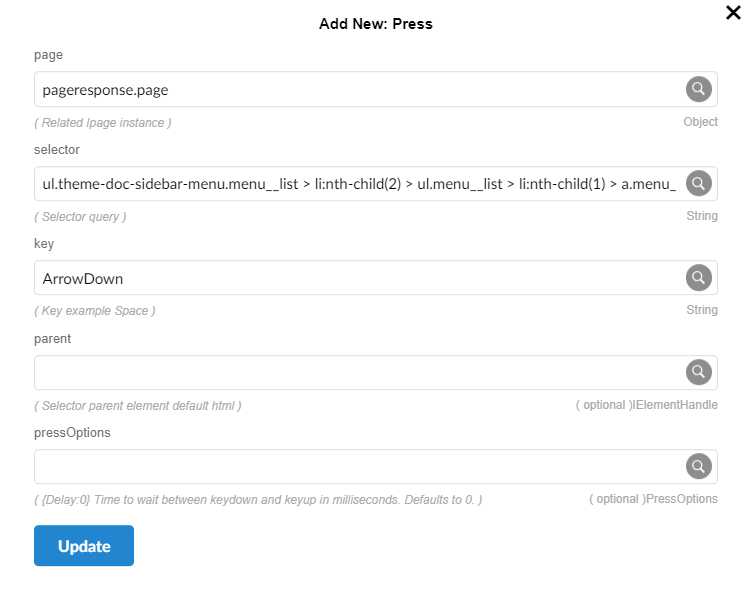
The press function allows you to automate keyboard interactions by simulating key presses on a specified web element. You provide the element you want to interact with and the key you want to press. This is useful for tasks like filling out forms or navigating through options.
Parameters
- page (visitResponse .page): The page object returned by Pupet.Visit.
- selector -
String: The CSS selector used to identify the element within the iframe. For example, #button-id could refer to a button element's ID. - key : This parameter represents the key you want to press programmatically
Key Descriptions
- Tab: Moves the focus to the next focusable element on the page.
- Escape: Closes open menus or exits the current modal window.
- ArrowUp: Moves the focus or selection up by one item.
- ArrowDown: Moves the focus or selection down by one item.
- Space: Clicks or activates the currently selected element.
- Delete: Removes the currently selected element.
- Enter: Activates the currently selected element or submits a form.
RpScript
How to use
Pupet.OpenBrowser({ headless: false, browser: "Chrome" });
var pageresponse = Pupet.Visit("Control Center Tutorials | Eras ");
Pupet.Press(pageresponse.page, "ul.theme-doc-sidebar-menu.menu__list > li:nth-child(2) > ul.menu__list > li:nth-child(1) > a.menu__link", "ArrowDown", null, null);
Pupet.Press(pageresponse.page, "ul.theme-doc-sidebar-menu.menu__list > li:nth-child(2) > ul.menu__list > li:nth-child(1) > a.menu__link", "Enter", null, null);
Wait(3);
Pupet.CloseBrowser();
Extension